
User Management
Teams
Usage, Structures, Management, and Permissions
Tip
Teams are created in the User management → Users and Teams section. They are designed to structure and optimize workflows.
Usage
Teams, for example, ensure that the right users receive the appropriate tickets and enable a clear organization of responsibilities.
Specific skills (Skills) and communication channels can be assigned to a team, ensuring targeted routing of customer concerns to qualified employees.
Team structures
In addition to regular teams, subteams also offer diverse possibilities: From specialization in complex topics or even as a training environment for new employees. With graduated responsibilities, they can substantially improve service quality and efficiency. Here are 2 examples:
1. Team "Contract termination"
- The "Contract Termination" team has the skills "Cancellation", "Moving", and "Revocation", with the channels "E-Mail", "Chat", "Phone", and "Letter". All users of this specialist area receive tickets on these topics in the autopilot mode.
- The subteam "VE-Death" has the skill "Death" in the same channels. It is specialized in properly handling this sensitive special case at the end of the contract.
2. Team "Contract framework"
- The "Contract framework" team has the skills "Documents", "Customer Portal", "Address Change" and "Contract Details", with the channels "E-Mail", "Chat", "Phone", and "Letter". All users of this department are assigned tickets in the autopilot that match these properties.
- The subteam "VR-Training" has the same skills, but only the channel "E-Mail". It consists of new employees who deepen their expertise by handling written customer inquiries before they are used in real-time channels such as phone or chat.
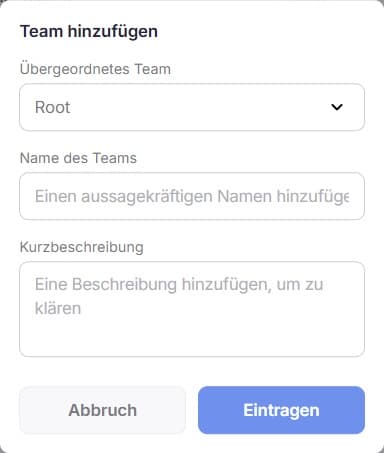
The "Parent Team" field determines whether a team is created at the top level ("Root") or as a subteam and is subordinated to an existing team.
Data Availability
Access to analytics data can also be managed for each team. This is, for example, helpful for a "Supervisor" team that evaluates agents' performance, or a "Contract Termination" team, which does not need access to analytics data at all.
Assignment of Roles and Permissions
Each team is assigned an individual or base role, thus clearly regulating the access rights of the members.
Info
The naming of teams should be clear and understandable. A description that explains the purpose of the team facilitates management. A well-thought-out team structure ensures efficient processing of customer inquiries and promotes collaboration within the company.
Routing and Rights
On the team level, both routing configurations such as skills/skills, assigned channels as well as access rights can be configured by role assignment.
Only when the Adopt team settings for routing and access rights setting is activated at the user level are these applied to the employee. In this case, the team settings apply, not the user settings.
Here is the completed markdown description including a table with three meaningful examples from the customer service context:
If a user is assigned to multiple teams, the following rules apply:
- Routing settings: Employees receive the sum of all team settings (accumulation of Skills/Tags and channels).
- Role selection: Employees receive the strongest role, i.e., the role that has the highest absolute number of permissions.
| User | Teams | Team Roles | Team Skills | Team Channels | Result (User Settings) |
|---|---|---|---|---|---|
| User 1 | experts, agents | experts: admin; agents: agent | experts: [technik]; agents: [bestellung] | experts: [E-Mail]; agents: [Chat] | Role: admin; Skills: [technik, bestellung]; Channels: [E-Mail, Chat] |
| User 2 | social, backoffice | social: supervisor; backoffice: editor | social: [community]; backoffice: [rechnung] | social: [System]; backoffice: [E-Mail] | Role: supervisor; Skills: [community, rechnung]; Channels: [System, E-Mail] |
| User 3 | hotline, vip | hotline: agent; vip: power-user | hotline: [eingang]; vip: [vip] | hotline: [Telefon]; vip: [E-Mail] | Role: power-user; Skills: [eingang, vip]; Channels: [Telefon, E-Mail] |
Info
In Q1 2026, the inheritance rule will be harmonized: Then, permissions will be cumulated just like routing settings.