
Tickets
Customer Identification
Steps and Verification
Customers are identified by contract and/or customer number and email address. Depending on the requirement, other features, e.g. the meter number can also be integrated.
Customer is uniquely identified:
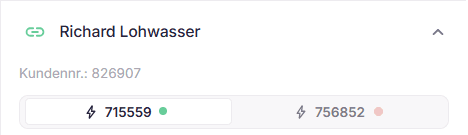
Relation between ticket and customer is marked in green.
Name, customer number, and contracts are correctly displayed.
Warning
Customer cannot be uniquely identified:
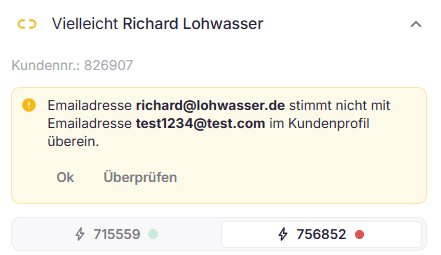
Relation between ticket and customer is marked in yellow.
Name, customer number, and contracts are displayed subject to verification. A review is required.
By clicking "Ok", the suggestion is accepted, and the relation between the ticket and customer is marked in green.
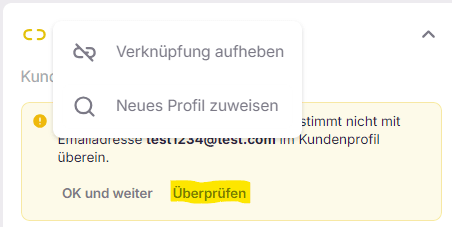
By clicking "Review", all links to the ticket can be disconnected or a new profile can be assigned.
With the subsequent search, the correct customer can be found and assigned by name, email address, contract number, or customer number.
If no relation between the ticket and the customer can be established, an "Unknown User" and a search field are displayed.
Further actions
- Re-detect customer – runs the automatic customer identification again, for example after the customer has sent more details.
- Legitimize customer – if a customer is identified but not legitimized, the hint "Identified but not legitimized" appears. After checking the details, the customer can be legitimized manually. Only legitimized customers can be handled by AI agents without approval. More: Legitimation of customers