
Routing & Tags
Access Restriction in the Ticket Backlog
Application examples and configuration
Tip
In complex service setups with multiple tenants, partners, or project areas, it may be necessary to limit the visibility of the backlog and restrict the allocation of tickets to certain tags.
The Backlog access restriction ensures that users or entire teams only see and automatically get assigned tickets that are marked with specific tags. This ensures that only relevant requests are processed and sensitive data is not visible across teams.
Example
A service provider handles customer service for several municipal utilities, including Stadtwerke Voltlingen and Stadtwerke Stromhain. The service provider uses the same enneo-instance for both municipal utilities. The team "Stadtwerke Voltlingen" should only see tickets from Stadtwerke Voltlingen.
- In the Team settings, Restrict displayed tickets using tags is activated.
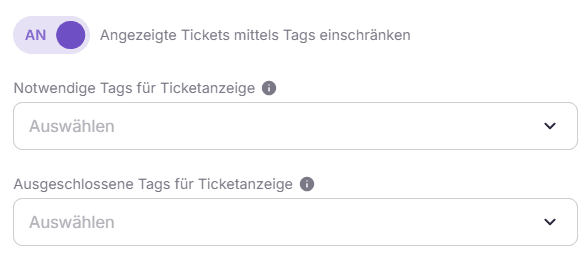
Required tags decide both what the team is offered and what it may open: only tickets carrying at least one of them appear in the Backlog and are routed to the team, and a ticket carrying none of them cannot be opened.
Excluded tags take a ticket out of this team's Backlog and routing as soon as one of them is on the ticket. The team is no longer offered it and no longer sees it in the overview, but it stays reachable by a direct link, from the customer's ticket history and from a free-text search.
- For Required tags for ticket display, the tag
Tenant: Stadtwerke Voltlingenis selected.
Result: Only tickets with the tag Tenant: Stadtwerke Voltlingen are displayed in the Backlog and considered by the Autopilot. The tickets from Stadtwerke Stromhain are not offered to this team and cannot be opened by it — a free-text search is the one exception, see below.
Impact of the Restriction
The access restriction only affects the Ticket overview or the Backlog, and the Smart Routing. Users who inherit their settings from the team automatically adopt the restrictions set there.
Note
If a user inherits the settings of several teams with different necessary tags, these are treated as alternatives: A ticket is displayed as soon as at least one of the necessary tags from the inherited teams is present.
The two lists do not restrict the same thing, and the difference decides what an agent can still reach.
Excluded tags — routing only. The ticket leaves this team's Backlog, its Autopilot and its skill-based dashboards. It stays reachable by a direct link, from the customer's ticket history and from a free-text search, and an agent who reaches it that way can also work on it. This is deliberate: an agent on the phone has to be able to put together the whole picture of the customer, including what another team handled.
Required tags — routing and access. A ticket carrying none of the required tags is not offered to the team, and it also cannot be opened: neither by a direct link, nor through its conversation, its intents, its quality assessment or its events. A free-text search still lists such a ticket, so an agent can see that it exists and is refused when opening it from the result.
Two exceptions apply to the required tags: a ticket assigned to the agent always stays reachable for them, and the permission "Direct selection of tickets outside configured required skills" waives the required-tag check entirely.
This also applies to tickets without a routing-relevant tag, for example tickets that carry only categorization tags. Any agent can otherwise receive them (see Tag Matching), but they are not assigned to a team with required tags as long as none of those tags is on the ticket.
Warning
Required and excluded tags only take effect with routing relevance enabled. A tag without routing relevance is ignored in both lists. If routing relevance is switched off for a required tag, the restriction through that tag is gone — if it was the only one, the team sees and receives all tickets again.
Beyond this, neither list is a confidentiality boundary: whoever reaches a ticket may also work on it. What stays hidden independently of these settings is the name of the colleague who handled it — that needs the corresponding permission — and any tag marked as private.
System Configuration
-
Activate restriction for a team or a user
- Area
Teams or User Management - Enable setting: "Restrict displayed tickets using tag"
- Area
-
Define tags
- Field: "Required tags for ticket display" and/or "Excluded tags for ticket display"
- Select desired tags
Best Practices
- The use of tag structures should be clear and consistent, e.g.,
Tenant_XorProject_Y. This facilitates maintenance, evaluation, and error analysis. A variety of categories are available in the General Tags. - Access restrictions should be used to clearly represent responsibilities and protect sensitive data. It is not a substitute for role or rights concepts.