
Contact Channels
Voice and Telephony
Voicebots, enneo ACD, employee telephony, and integration options
Tip
At Settings → Telephony, voicebots, call flows, phone numbers, SIP trunks, and employee telephony are configured.
Enneo Voice combines the telephony functions for customer service: voicebots, queues, routing, handover to employees, and optionally the enneo employee telephony. Which components are used depends on whether enneo is taking over the complete service telephony or is being integrated into an existing PBX/ACD landscape.
Typical integration options
The following overview shows the most common variants. It helps to decide whether an existing PBX/ACD is still needed, whether enneo is taking over call distribution, or whether both systems are operating in parallel.
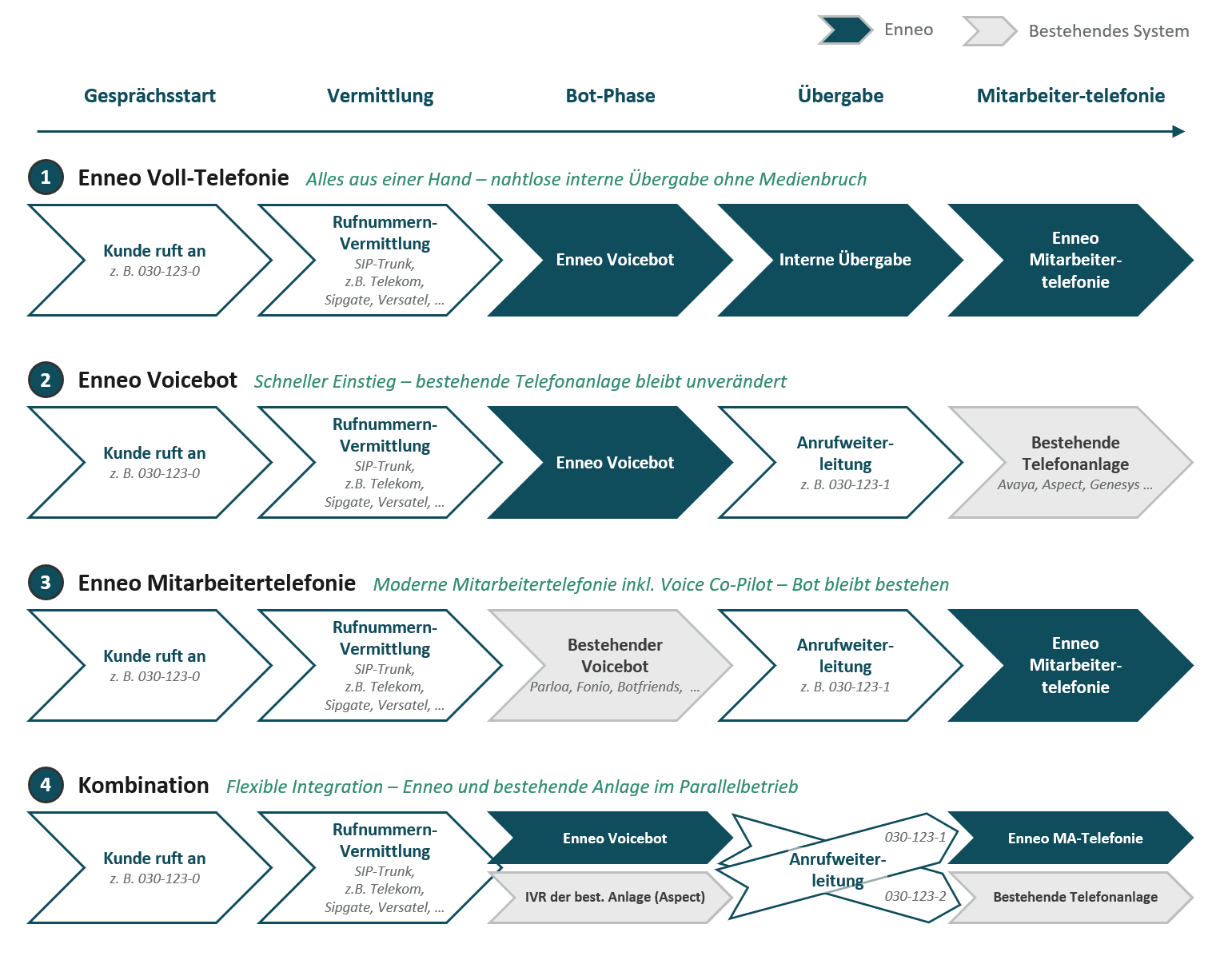
Call flows in enneo
Each switched line has a call flow, which can be individually configured. The call flow can combine freely, for example:
- Voicebots for automated speech dialogs
- Employee telephony for handover to agents
- External redirections to other phone numbers or existing telephony systems
- Switches, e.g., by date, time, holidays, or working hours
- Announcements, e.g., greetings, queues, or information texts
Phone numbers and SIP trunks
For incoming calls, enneo requires a phone number, which is connected via a SIP trunk.
A SIP trunk is, put simply, the technical connection between a telephone number and a telephony system. It ensures that calls from a public phone number are delivered to the right system – for example, to enneo or to an existing PBX.
Two options are available for telephony:
- Enneo provides the telephony connection: the phone number is connected via our SIP trunk supplier Sipgate.
- The customer uses their own SIP trunk: Existing or new phone numbers are connected via their own provider, e.g., if phone numbers are already contractually located with the customer.
Setting up own phone numbers
When using your own phone numbers, the following steps are required in this order:
- Set up SIP trunk - Enter your own SIP trunk in the telephony settings.
- Add phone numbers - Assign the desired numbers to the SIP trunk.
- Assign numbers to the lines - Assign the phone numbers to the corresponding lines and call flows.
Prerequisites for the enneo employee telephony
For employees to be able to phone via enneo, the following conditions must be met:
Activate global setting
The option "Incoming customer calls" must be activated under Settings → Telephony → Agent Telephone.
Channel assignment
The user must be assigned to the Telephony channel in his profile settings.
Assign skills (with skill-based routing)
If Skill-Based Routing is used, the necessary skills that are recognized in the course of the AI bot conversation must be assigned to the user.
Online status
The user must be online.
Active telephony status
The user must be in an active telephony status. This can be set by the user himself in the top right corner of the profile or by a supervisor in the control dashboard.
Tip
The event log makes it possible to trace why the enneo routing engine has selected a specific employee or has not found a suitable employee.
What should be clarified before setup
For the technical implementation, these points should be clarified in advance:
- Which service numbers should run via enneo?
- Who provides the SIP trunk: enneo or a supported provider or the customer?
- Is there already a PBX or ACD that is still to be used?
- Should enneo only take over the voicebot, the employee telephony, or both?
- Where should calls be handed over after the voicebot?
- Should enneo take over routing to employees or an external system?
- What working hours, announcements, queues, and escalations apply per line?
Important differences
Warning
Enneo ACD is not a SIP trunk. A SIP trunk provider, e.g., Deutsche Telekom or Sipgate, holds the phone numbers and forwards calls to telephone systems, e.g., to enneo. At Sipgate, prices start at 17 euros per month for 10 parallel conversations. Phone number porting is easily possible. Enneo ACD, on the other hand, is the service center logic within enneo: It processes calls, controls call flows, queues, routing, and transfers.
Warning
Enneo is not a traditional office telephone system. Enneo Voice is intended for service center phone numbers where incoming calls are distributed, automated, prioritized, and passed on to suitable staff. Enneo does not replace traditional user telephony, where each employee receives a personal extension, a desktop phone, or a complete Office-PBX functionality. A classic telephony/PBX solution is still required for this.
Firewall Settings
For users making calls through enneo, the following network connections need to be allowed:
| Host | IP Address | Port | Protocol | Purpose |
|---|---|---|---|---|
turn1.enneo.ai | 91.99.219.69 | 3478 | UDP | TURN |
turn1.enneo.ai | 91.99.219.69 | 5349 | TCP | TURNS |
turn1.enneo.ai | 91.99.219.69 | 32769–65535 | UDP | Media |