Setting up smart AI agents
Detection
Define when an AI agent is assigned to a ticket
Tip
Detection defines when an AI agent is responsible for a ticket. For smart AI agents it has a second job: the detection prompt tells other AI agents when to call this AI agent as a tool.
Only for authenticated customers
If Only for authenticated customers is active, the AI agent only works if the customer was identified with sufficient certainty. This is suitable for all processes that change or disclose customer data. In the resolution plan, a step of such an AI agent can only be confirmed if the customer has been identified.
Detection method
| Method | When the AI agent is assigned |
|---|---|
| AI detection | When the AI matches the request to the AI agent based on the Instruction to AI |
| Condition detection | When ticket, customer or contract data meet the defined conditions |
| AI and condition detection | When both apply |
| AI or condition detection | When either applies |
If no method is selected, the AI agent is never detected automatically. It can then only be added to the ticket manually or called as a tool by another AI agent.
Instruction to AI (detection prompt)
For the methods with AI detection, the Instruction to AI field describes the cases in which the AI agent is responsible. There are tabs for Standard, Chat and Telephony; Chat and Telephony appear when the AI agent is assigned to these channels. Tabs without their own instruction use the Standard tab.
The detection prompt is used in two places:
- When a ticket is analyzed, to find the matching AI agent.
- When another AI agent handles a request and decides whether to call this AI agent as a tool – for example in the resolution plan or in chat (see Tools).
How to make it good:
- Describe concretely what the AI agent is for – and what not: "Change of bank details or SEPA mandate. Not for questions about chargebacks or dunning."
- Name typical customer phrasings.
- Explicitly delimit overlaps with other AI agents.
- English descriptions are often detected somewhat more reliably than German ones.
Conditions
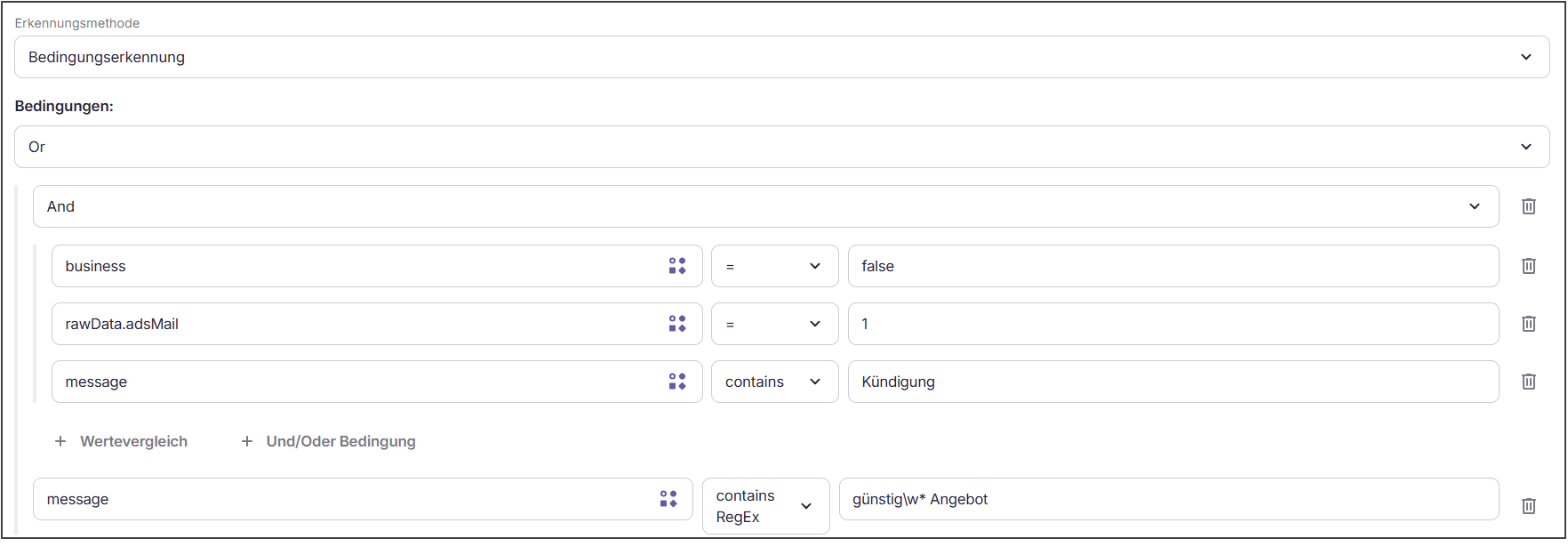
The AI agent is assigned based on ticket, customer and/or contract attributes. Conditions can be linked as desired.
Operators and expected values
| Operator | Expected Data Type | Effect |
|---|---|---|
= | string, number or boolean | Checks whether the data point exactly matches the specified value. |
!= | string, number or boolean | Checks whether the data point differs from the specified value. |
contains | string | Checks whether the data point contains the specified text. |
not contains | string | Checks whether the data point does not contain the specified text. |
in | array | Checks whether the data point is contained in the specified list of values. |
not in | array | Checks whether the data point is not contained in the specified list of values. |
> / >= / < / <= | number | Compares the data point numerically with the specified value. |
is null | null or no value | Checks if no value is present. |
is not null | null or no value | Checks if a value is present. |
contains RegEx | string | Checks if the data point matches a regular expression. |
Data source of the data point
Each data point has a data source. It determines what the entered field name refers to. The list of available data points for the chosen data source can be opened via the symbol on the right in the field.
| Data Source | Examples of Field Names | Note |
|---|---|---|
| Ticket Data | subject, sender, channel, message | Use message for the message text. body contains the unprocessed raw text and is only populated until the first AI processing of the ticket — therefore not suitable as a condition. |
| Customer Master Data | firstname, email | Only populated if the customer has been recognized. |
| Contract Master Data | status, deliveryState, counterNumber | Always choose this data source for contract attributes. The contract is loaded immediately before checking the condition, so the value is available even at the first processing run. |
| Tags | — | Compares the tags assigned to the ticket. |
Addressing contract fields via the ticket data (e.g. metadata.ticket.contract.status) is not reliable: The ticket data are compiled before the contract was recognized and do not contain the field at the first processing run.
Empty data points
A data point can be empty without the configuration being incorrect: The customer was not recognized, the contract does not provide this field, the email has no subject.
An empty data point is checked normally — empty is a value, not a skipped check. The operator decides:
| Operator | Result with Empty Data Point |
|---|---|
=, contains, in, > / >= / < / <=, contains RegEx | not fulfilled — empty matches nothing |
!=, not contains, not in | fulfilled — the search term is not contained in an empty data point |
is null / is not null | fulfilled / not fulfilled — they ask for existence |
Thus, a limiting condition (Contract status = active) remains closed with an unknown value, while an excluding condition (Subject not contains "Final Bill") applies.
If a condition should only apply when the value is actually present, add this explicitly:
Data point is not null
AND Data point not contains "Final Bill"A field name that does not exist at all — perhaps a typo — behaves like an empty data point, without a visible error message. With a negating operator, the condition is then fulfilled although nothing was checked. Therefore, test new conditions on a real ticket before activating the AI agent.
Example
Linking of conditions for customer concerns for marketing purposes: